RV Wi-Fi DishyDock 12V System - Powering Starlink for RVs, Caravans & Off-Grid Travel
📄 Download User Guide
With Starlink, global connectivity has become a reality - but at RV Wi-Fi, we’ve gone one step further.
Our RV Wi-Fi DishyDock 12V Integration System transforms Starlink into a truly RV-friendly solution, allowing travellers to enjoy reliable, high-speed satellite internet anywhere in Australia - without needing bulky inverters or constant reconfiguration.
Seamless Starlink Integration - Built for the Road
Starlink connects you wherever the sky is clear, and the RV Wi-Fi DishyDock System ensures your connection is as simple and efficient as possible.
This complete 12V power and data system is engineered to integrate Starlink directly into your caravan or RV’s electrical system, removing unnecessary power conversions and delivering more efficient performance.
What’s Included in the RV Wi-Fi DishyDock Pack
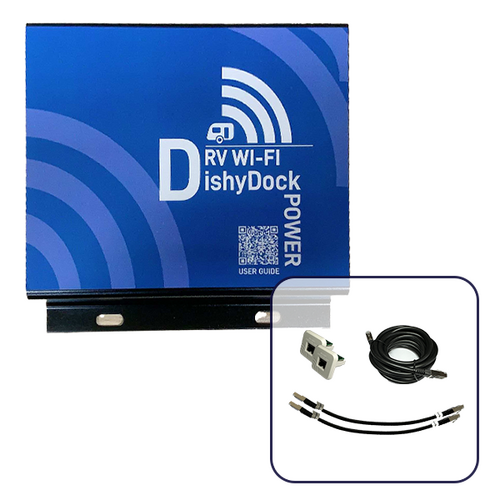
DishyDock Power:
The core of the system - it converts 12V power directly from your battery to your Starlink Dishy without needing a 240V inverter.
Unlike typical converters that waste energy in multiple steps, DishyDock Power delivers a single, direct conversion, dramatically reducing power loss and improving efficiency off-grid.
2 × 0.3 m AWG23 Shielded Ethernet Cables:
Pre-configured, high-quality cables for secure, interference-free data transfer.
12V Power Cord:
Custom-fitted for your RV’s dedicated 12V system, ensuring stable operation.
Connection Port Types
Weatherproof Port (IP65 Rated):
Designed for external mounting, this port is both dust-tight and water-resistant, providing safe outdoor connectivity and a clean finish, when paired with our Starlink weatherproof cables.
Internal RJ45 Port:
Perfect for enclosed or interior installations, this port offers a professional and discreet solution for connecting DishyDock inside your van.
Back to Back Port:
Back-to-Back Waterproof Port
No need for additional cables, this through wall weatherproof port sets up your DishyDock system within easy reach. Back-to-Back Functionality: Dual connections in one port, designed to save space and time. Pair with our Starlink Weatherproof cables for a weatherproof seal.
Router Options
Choose the setup that best suits your needs:
RV Wi-Fi 5G Router (Wi-Fi 6, 4×4 MIMO):
The fastest caravan router in Australia, ideal for switching between 5G mobile networks and Starlink.
DishyDock Router:
Designed specifically for permanent Starlink integration — mount it neatly inside your caravan for a clean, always-ready setup.
All routers connect seamlessly with DishyDock Power and your Starlink system, allowing you to travel from cellular zones to remote off-grid areas without reconfiguring your network or changing passwords.
Cable Length Options
Select the ideal Ethernet cable length for your layout:
No cable (for back to back - only setup)
3 meters / 5 meters / 10 meters / 15 meters options
Each cable is shielded, and rated for reliable long-distance data transmission - perfect for flexible installations in caravans, trucks, or boats.
Smart Power Integration
The RV Wi-Fi DishyDock 12V System eliminates the need for complex power conversions. Traditional Starlink setups convert power from 12V → 240V → 48V, wasting energy at each step.
DishyDock simplifies this into a single, direct conversion, saving power, improving reliability, and extending battery life - an essential upgrade for off-grid living.
Why Choose RV Wi-Fi DishyDock
- Purpose-built for Starlink Gen 2, Gen 3, and Starlink Mini systems
- Compatible with RV Wi-Fi 4G and 5G and DishyDock routers
- Designed and engineered in Australia for Australian conditions
- Eliminates messy cables - no more running wires through windows or doors
- IP-rated for dust and weather resistance
- Simple plug-and-play installation
- Supported by Australian-based customer service
⚠️ Installation Notes
- A dedicated dual-socket 12V outlet must be used (wired to the battery on its own circuit).
Recommended: “Accessory Socket Surface Black Mount Twin Sockets H/D 81160BL”.
- For weatherproof options, see Generation 3 Starlink Cable or Generation 2 Starlink Cable options.
Not compatible with Starlink Gen 2 High Performance models.
The RV Wi-Fi Advantage
At RV Wi-Fi, we’ve redefined what connectivity on the road means.
Our DishyDock 12V System bridges the gap between mobile 5G coverage and Starlink’s global satellite reach - giving travellers uninterrupted internet anywhere in Australia.
One network, one connection, one system | RV Wi-Fi and Starlink, working together.